Jun 4, 2026
Open Google Meet Links in the Google Meet PWA with BetterTouchTool
I click a lot of Google Meet links, and I wanted them to open directly in the Google Meet PWA instead of another Chrome tab. Here’s the BetterTouchTool setup that worked for me on macOS.
Install the Google Meet PWA
First, install Google Meet as a Chrome app/PWA:
Open Chrome.
Go to https://meet.google.com.
Use Chrome’s install/open-in-app control in the address bar to install Google Meet.
Confirm that this app exists:
ls "$HOME/Applications/Chrome Apps.localized/Google Meet.app"Get the Google Meet App ID
Chrome PWAs have an app ID. You’ll need the app ID so Chrome can launch the Google Meet PWA directly.
Run this:
plutil -p "$HOME/Applications/Chrome Apps.localized/Google Meet.app/Contents/Info.plist" | grep CrAppModeShortcutIDYou should see something like:
"CrAppModeShortcutID" => "kjgfgldnnfoeklkmfkjfagphfepbbdan"The value on the right is your Google Meet app ID.
Confirm the Command Works
Before setting up BetterTouchTool, test the command manually:
"/Applications/Google Chrome.app/Contents/MacOS/Google Chrome" \
  --profile-directory=Default \
  --app-id=kjgfgldnnfoeklkmfkjfagphfepbbdan \
  --app-launch-url-for-shortcuts-menu-item="https://meet.google.com/abc-def-ghi"
Replace the app ID if yours is different.
Replace abc-def-ghi with an actual meeting ID from one of your meetings.
If your Chrome profile is not Default, open the chrome://version page in Chrome. Look for Profile Path. The final folder name is the value to use for --profile-directory.
Running this command on the command line should open the Google Meet PWA launching and immediately joining the meeting.
Set Up BetterTouchTool
In BetterTouchTool:
Go to
Automations & Named & Other Triggers.Add a new trigger.
Choose
Did Open URL.Set
URLtohttps://meet.google.com/*Click the
Set BetterTouchTool Default Browserbutton and set BTT as the default browser. This allows BTT to receive clicked URLs, take action on the ones that match your triggers, and let all other links pass through to your regular browser.Add a
Execute Shell Script / Taskaction.For the
Scriptfield, use this script:
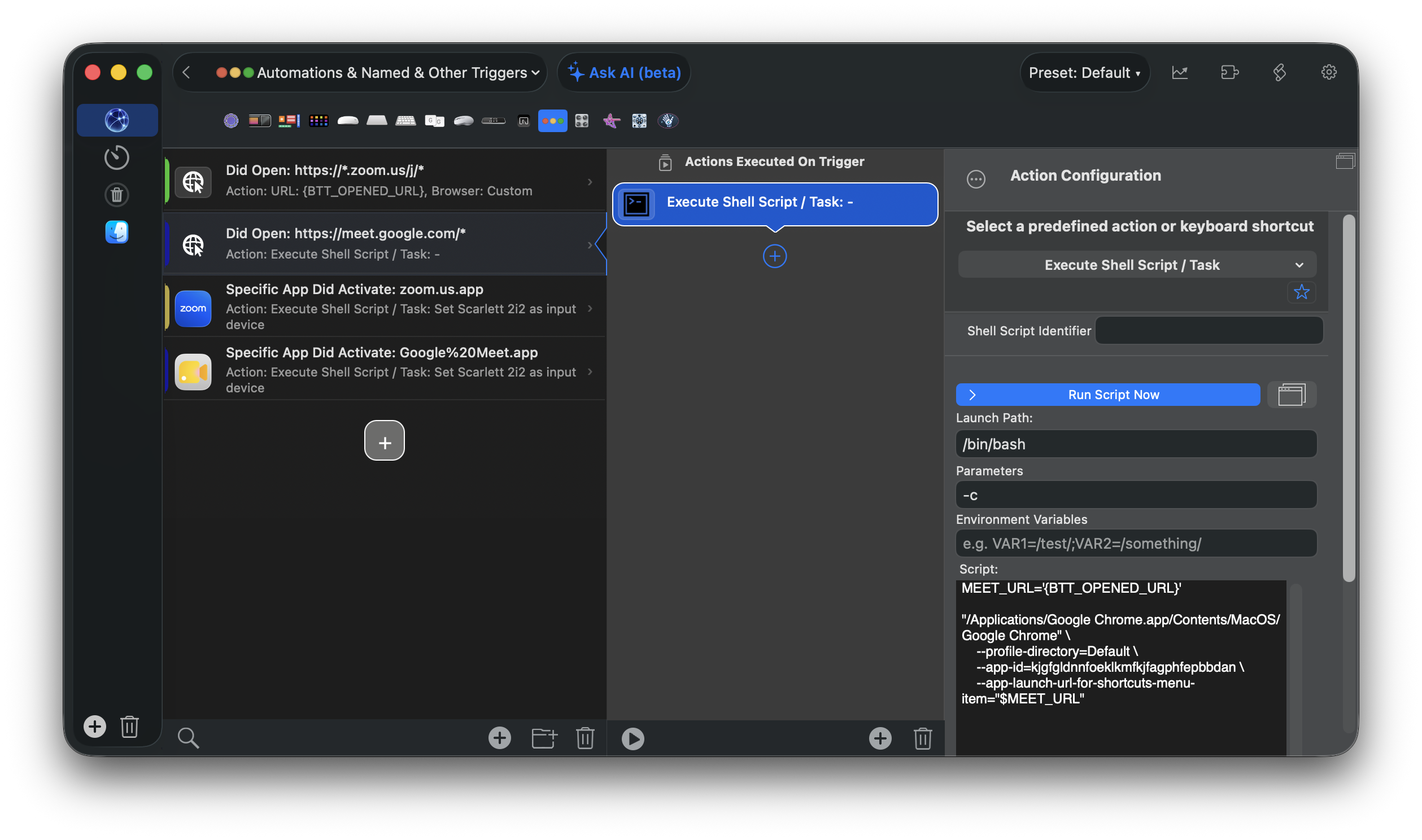
MEET_URL='{BTT_OPENED_URL}'

"/Applications/Google Chrome.app/Contents/MacOS/Google Chrome" \
  --profile-directory=Default \
  --app-id=kjgfgldnnfoeklkmfkjfagphfepbbdan \
  --app-launch-url-for-shortcuts-menu-item="$MEET_URL"
Replace the --app-id value with your Google Meet app ID and replace --profile-directory if your Chrome profile is not Default.
Your settings should look something like this:
Save the action and try clicking a Google Meet link. If everything is configured correctly, that meeting link should open immediately in the Google Meet app.